LeadHunter by Humans2Agents
AI that ranks thousands of prospects so you start with the best
Import your lists or find businesses on Google Maps. LeadHunter reads each account's website, scores it from 0 to 10 against the clients, partners or press you want to reach and tells you why, with duplicates merged. Then it keeps every relationship moving: each conversation logged, next steps with reminders, and what each customer cost.
15 minutes · Free · No commitment
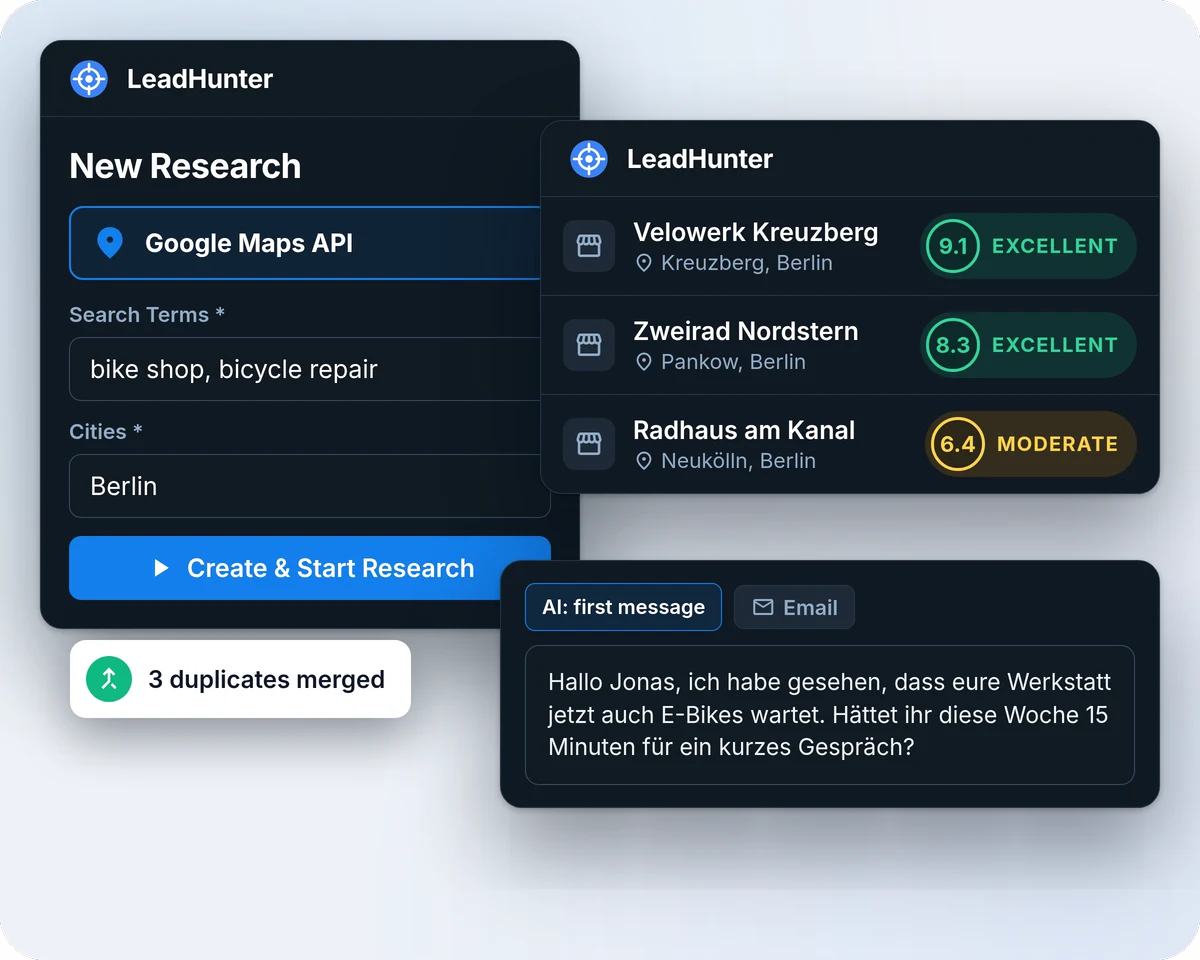
See LeadHunter at work
One market, from a Google Maps search to a first message, in 22 seconds.
15 minutes · Free · No commitment
From a long list to the right conversations
Bring in the accounts, let the AI rank them, follow through, measure.
-
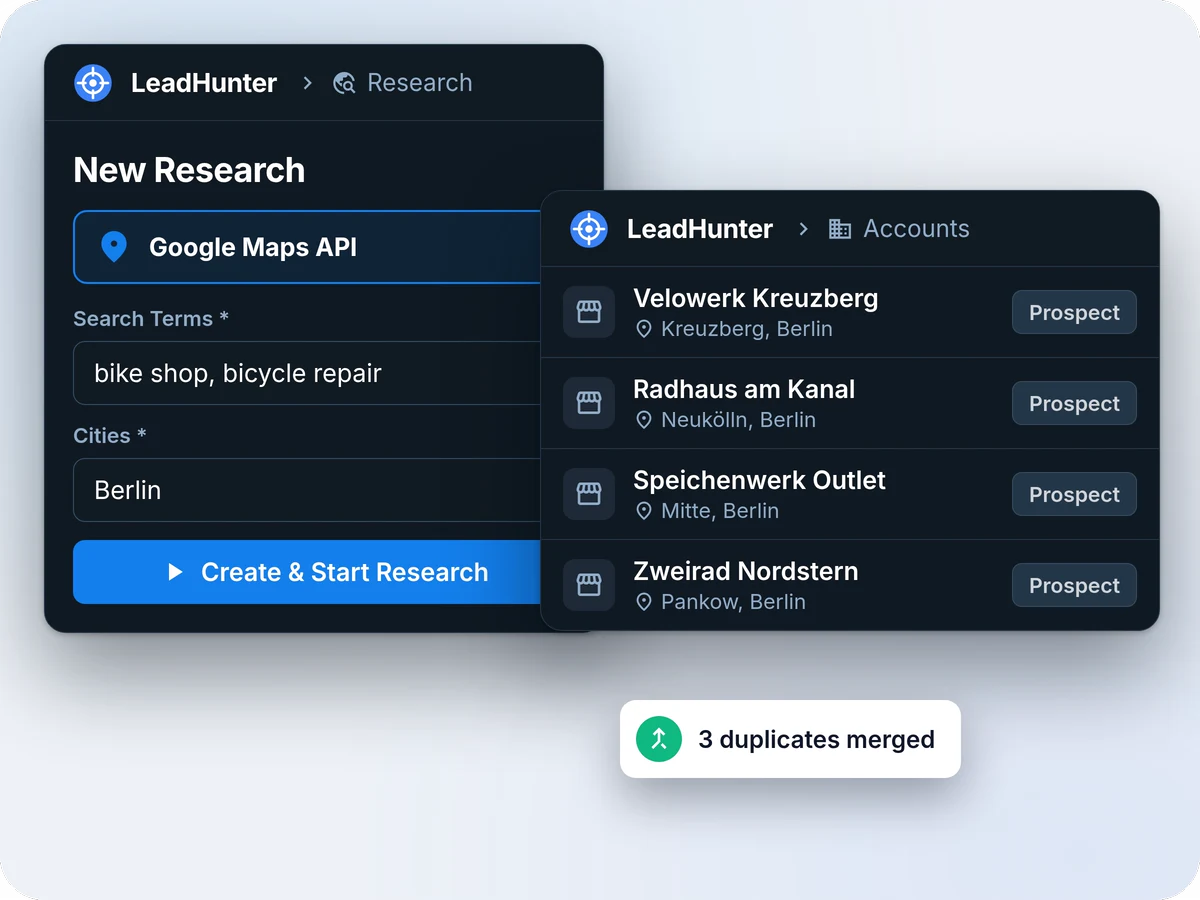
01 · Bring in
Bring your lists, or find new accounts
Import a CSV or Excel file with thousands of rows, run a Google Maps search by city and search terms, or paste a website. Every account is checked against five duplicate rules before it is saved, and duplicates are merged rather than deleted, so importing the same list twice is safe.
- CSV and XLSX import, up to 200,000 rows per file, with AI column mapping and undo
- Google Maps and web search research runs
- From a website: Quick lookup, or Deep research, which also captures the contact persons named on team and contact pages
-
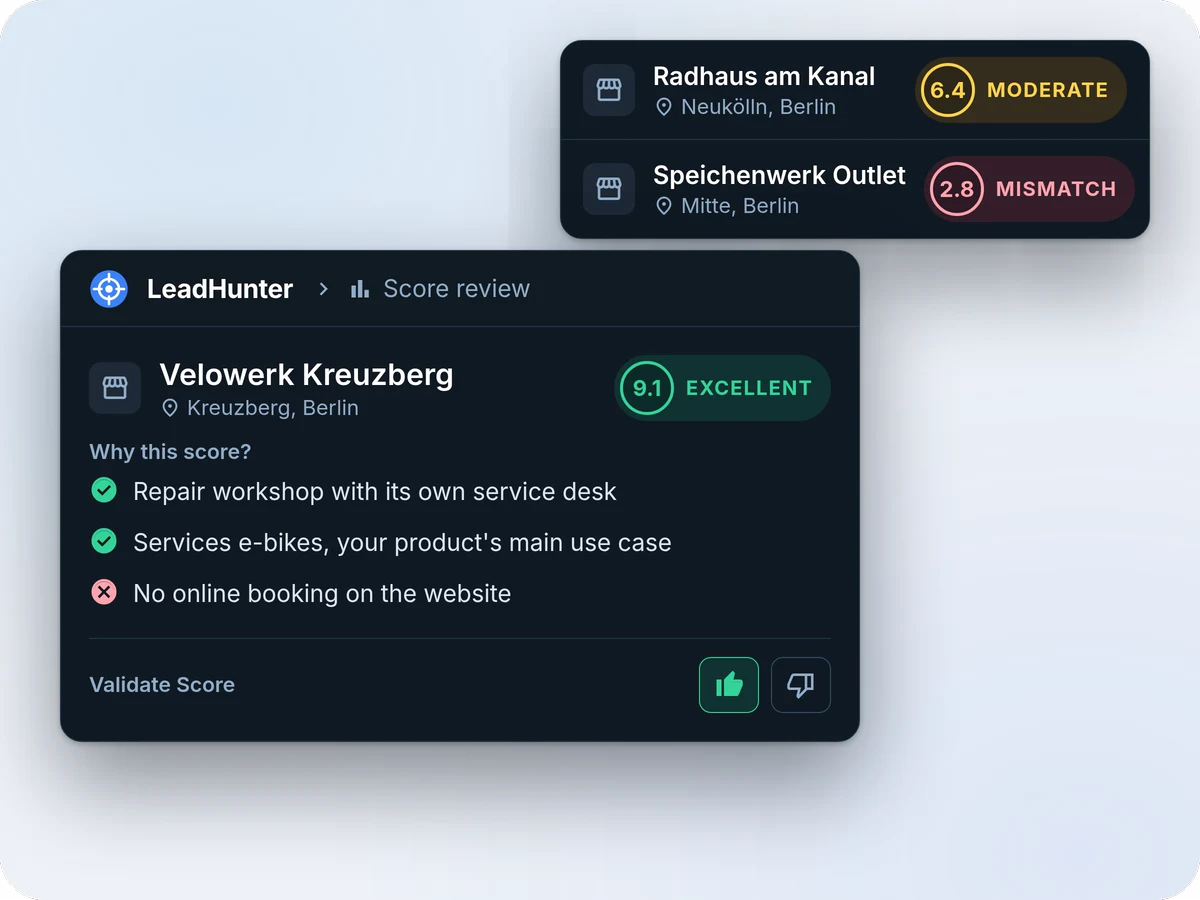
02 · Rank
Know who to work first
Describe your product and who you want to reach: customers, partners, press, influencers, investors or candidates. LeadHunter writes the target persona, reads each account's website and scores the account from 0 to 10 against it, with a label (Excellent, Moderate, Mismatch) and the reasons for and against. Sort thousands of accounts by score and review the best first; after about ten reviews, your verdicts start sharpening the next scores.
- "Why this score?" on every account
- One score per goal: a shop can be a poor sales fit and a good partner
- Override a score, or give feedback and rescore the whole campaign
-
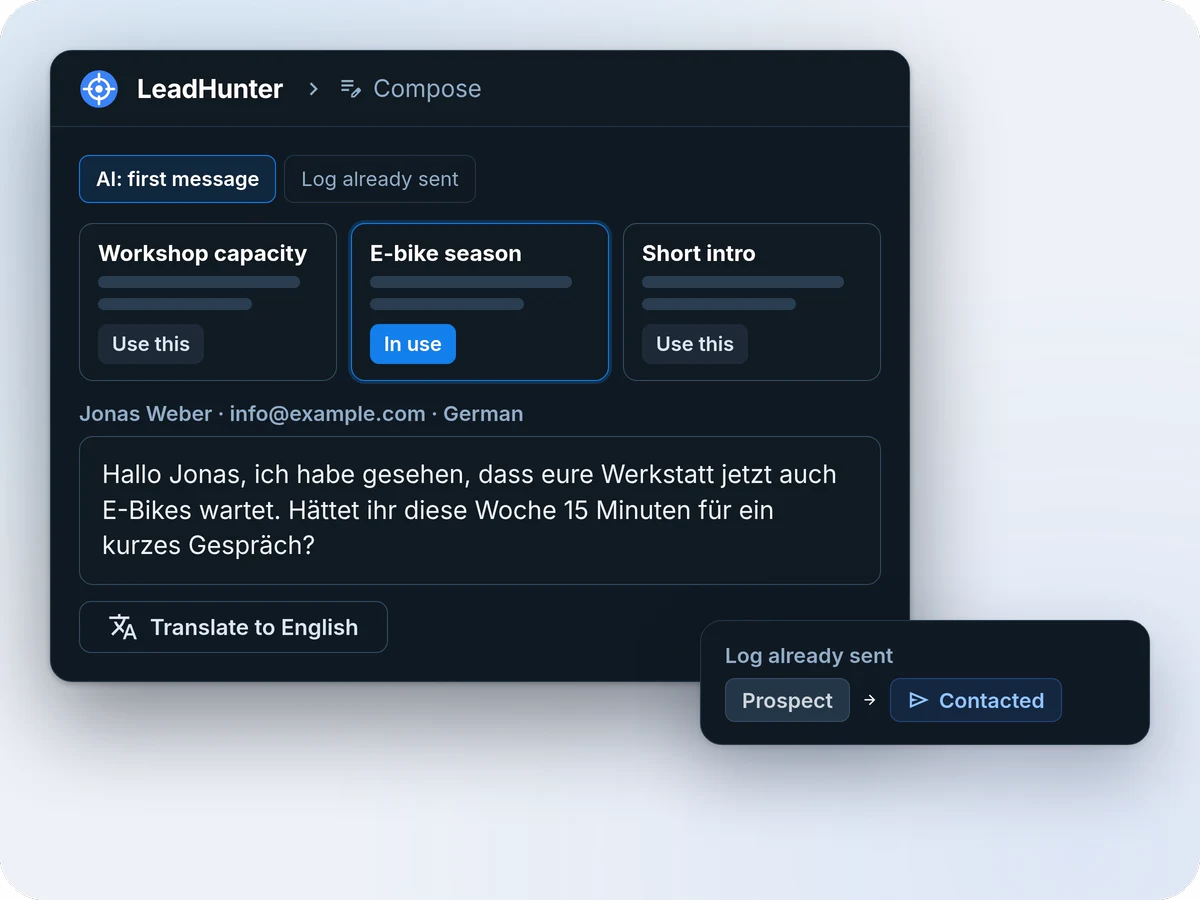
03 · Follow through
Keep every relationship moving
Log every conversation, whatever the channel: the email you sent, the WhatsApp reply, the call, the people you met at a trade fair. LeadHunter keeps them on one page per account, translates the replies and updates the account's status. It logs; it does not send. For what comes next, add a next step with a due date, whose move it is and who owns it, and LeadHunter reminds them.
- "Draft with AI" gives three approaches for each first message, in the account's language
- Next steps from one-click Quick add templates, with the usual next one suggested when a step is done
- A reminders bell, a Follow-ups page, a morning email and a calendar feed for Google Calendar, Apple Calendar or Outlook
-
04 · Measure
See what works, and what each customer cost
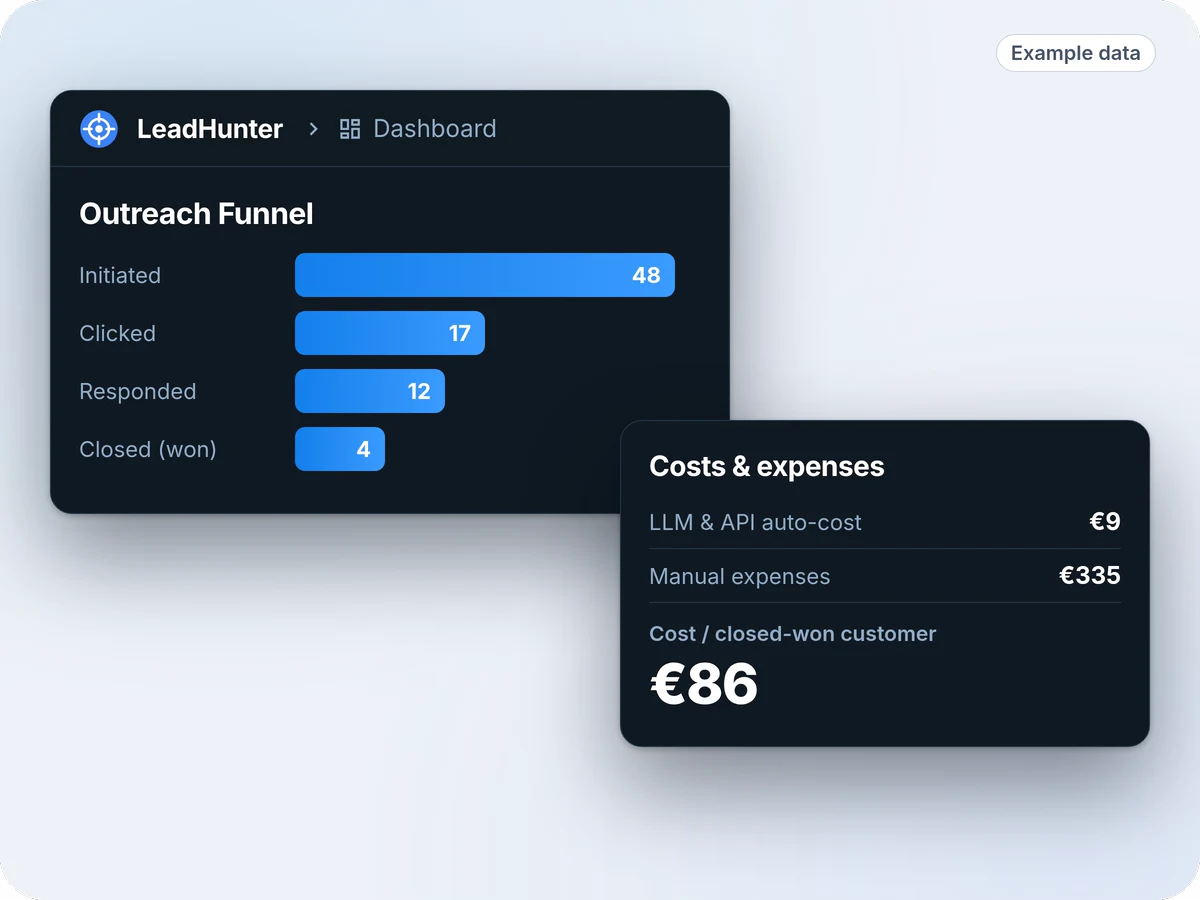
Run campaigns per product and goal, and record where inbound accounts come from: Google Ads, Meta, referrals, events, or an influencer's channel with its own promo code and tracked links. AI and Google Maps costs are tracked automatically; add ad spend, agency fees and hours, and each campaign and channel shows what it cost, the accounts it won, their value and the return.
- The Outreach Funnel: accounts contacted, clicked, replied and won
- Cost per contacted account, per reply and per customer won
- Client Pulse reminds you which customers you have not talked to lately
Illustrations with invented example data.
Everything in LeadHunter
All of this works today.
-
AI scoring and ranking
0 to 10 against your target persona, per goal, with the reasons, calibrated by your own reviews.
-
Website research
Phone, email, social profiles, language, business type and a short brief, read from each website.
-
Google Maps research
Search by country, city and terms; accounts arrive with address, phone and rating.
-
Import and export
CSV and XLSX in, with AI column mapping and undo; CSV out from any filter.
-
Zero duplicates
Google Place ID, name and city, phone, domain and similar names are checked; a merge keeps every field.
-
AI drafts and translation
Three approaches per first message, follow-ups, and replies translated both ways.
-
Every conversation
Email, LinkedIn, WhatsApp, Instagram, X, calls and SMS on one page per account, shared with your team.
-
Next steps and reminders
Whose move it is, who owns it and when it is due, with templates, a morning email and a calendar feed.
-
Client Pulse
Usage pings from your product, a contact cadence and a weekly digest of overdue clients.
-
Campaigns and channels
Campaigns per product and goal; inbound channels such as ads, referrals, events and influencers, with promo codes and tracked links.
-
Cost, value and ROI
Automatic AI and API costs plus your own expenses, against the accounts and value each campaign or channel won.
-
Teams and webhooks
Owner, Admin and Member roles, one project per client for agencies, and signed webhooks to your CRM, Zapier, n8n or Make.
Built for AI agents
LeadHunter has a REST API, the same one the dashboard uses. Your AI agents, a WhatsApp bridge or a mail tool can import lists, log every message they send, add and close next steps, mark customers and Do not contact, and read an account's whole history.
- Token access: an agent sees only the projects it belongs to
- A message or next step posted twice with the same id is logged once
- Signed webhooks when an account is created, changes status or replies
Is LeadHunter for you?
Built for
- Small teams, one to five people, selling one or several products
- Teams that sell in several languages: the AI drafts and translates in each account's language
- Agencies running outreach for several clients, each in its own project
- Founders who want to know which channel brings customers, and what each customer cost
What LeadHunter is not
- Not a sending engine: you send from your own email, LinkedIn or WhatsApp
- Not a contact database: you bring the accounts or find them on Google Maps
- Not a CRM replacement: no invoicing, contracts or support tickets
- Not for mass sends of the same template
Frequently asked questions
How does the AI decide who comes first?
It reads each account's website and data, compares them with the target persona for the campaign's goal, and gives a score from 0 to 10 with the reasons for and against, so you can judge it in seconds. It gets better with a detailed product description, two or three example websites that fit and that do not, and your reviews: after about ten on a product, your verdicts feed the next scores.
Does LeadHunter send the messages for me?
No. You send through your usual channels (email, LinkedIn, Instagram, WhatsApp, phone) and log each message in LeadHunter, by hand or from your own tools through the API, so the scores, the funnel and your team stay in sync. There are no automated sequences.
Where do the accounts come from?
From your own CSV or Excel files, a Google Maps or web search, a website you paste, or the inbound leads you record. LeadHunter does not come with a pre-loaded contact database.
What happens with duplicates?
Every new account is checked by Google Place ID, name and city, phone, website domain and similar names in the same city. The first four merge automatically; similar names wait for your review. A merge keeps every field from every copy.
How does it remind me to follow up?
Each account has a Next steps card: what has to happen, whose move it is, who owns it and when it is due. The owner sees on the bell how many steps are overdue or due today, finds them on a Follow-ups page sorted by due date, gets a morning email listing them and, if they want, sees them in their own calendar through a private link.
Can our AI agents use it?
Yes, through the same REST API the dashboard uses, with a token. An agent can log the messages it sends (posting the same message id twice logs it once), add and close next steps and read an account's history, and it only sees the projects it belongs to.
Which languages does it work in?
The app is in English. The AI drafts and translates messages in the language of each account, such as Spanish, Catalan, French, German, Italian or Portuguese.
How do I start, and what does it cost?
LeadHunter has no public price yet. Book a free 15-minute call: we look at your market and tell you how it would work for your team.
See it rank your market
In a free 15-minute call we look at who you sell to and how LeadHunter would rank your accounts.
15 minutes · Free · No commitment